When i get pdf docs by mail, I always hesitate to open it as it is slow and a major pain in the ass. I sometimes wanna just browse through the document, rather than downloading it. Now what Google did is, they gave a "View" option near to the Download option. It looks like this:


Clicking "View" quickly opens the PDF inside your browser(not with Adobe Reader), complete with the graphics and formatting you expect to see in a PDF. It is the same feature used in Google Docs. Now at this stage, you can even view the document in html format, or download it or print the whole thing. Here.. take a look:
Read more:
Labels: Gmail Addons, GoogleGoodies


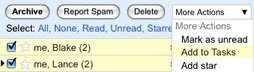 Tasks are arranged in the same kind of window as chats, so they're visible while you're scanning your inbox, reading mail, or searching (and in Settings, too!). Just pop your list out into a new window to use Tasks outside of Gmail.